Build and publish real web apps with Claude Code
Shipyard is a free plugin for Claude Code. You describe an app in plain words, and Shipyard builds it, puts it online and checks that it works before it says it is done.
Who it is for
You have Claude Code Pro and a free GitHub account. Maybe you have built a small site with AI before. You are not a developer, and you do not want to become one just to put something real online.
This guide is the manual for the plugin. It is also a self-paced course: every module has a plain-English page, the exact command to run, what "done" looks like, what to do when it goes wrong, and a short self-check.
What you need
- Claude Code with a Pro plan. About $20 a month.
- A free GitHub account. This is where your app's code lives.
- Everything else is free to start. A free Vercel account puts your app online, a free Supabase account holds its database and sign-in, and Node.js (a free program from nodejs.org) runs the tools. Setup walks you through each one.
The costs page shows what you pay if you go further, such as your own web address or taking payments.
Three steps
Install the plugin. In Claude Code, run these two lines.
/plugin marketplace add philipposk/shipyard
/plugin install shipyard@shipyard
Run setup once. It connects your accounts and keeps your keys safe. Plan on 45 to 90 minutes, mostly signing up. You can stop and carry on later.
/shipyard:setupMake an app. Answer a few questions, approve the plan, and Shipyard builds and publishes it.
/shipyard:new-app
The Start page goes through each step slowly, including what to click.
Six skills
A skill is a set of instructions that Claude Code loads when you ask for it. Shipyard has six.
/shipyard:setup: checks your tools, connects GitHub, Vercel and Supabase, and stores your keys safely. You run it once./shipyard:new-app: asks a few questions, writes a plan, builds the app, puts the code on GitHub, publishes it and runs checks./shipyard:design: choose how the app looks, from a site you like, a free design file, three drafted directions or one of eight ready-made looks./shipyard:launch: go from a free test address to a real product, with your own web address, sign-up emails, privacy and terms pages, payments, and phone or desktop apps./shipyard:ops: keep a live app healthy, with error alerts, health checks, code review on every change, safe auto-merge and backups./shipyard:video: make a product video of your app, built as code instead of a screen recording. It takes hours, so do it after launch.
What it costs to go further
Learning and demo apps cost nothing beyond Claude Code. A web address of your own is about $10 to $15 a year. Taking payments needs Vercel Pro at $20 a month, plus the payment provider's fees. The full table is on the costs page. These figures are from October 2026, so check them before you rely on them.
Eight ready-made looks
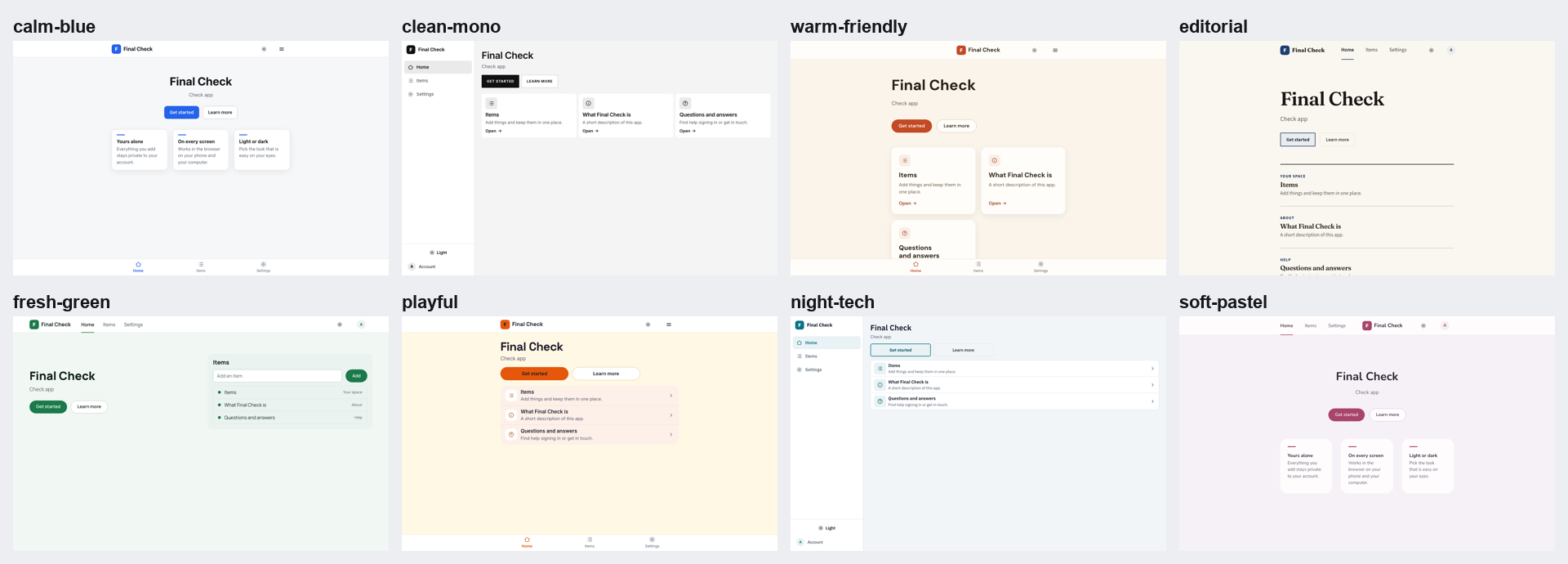
Shipyard can give your app one of eight looks. Each sets colours, fonts, menu style, spacing and light and dark mode, and is checked for readability. This is the same starter app in all eight. Open the picture to see it full size.
Ready when you are
The guide has ten short modules. Start with the install page, then read in order or jump to the one you need.